
How to setup an IMAP account
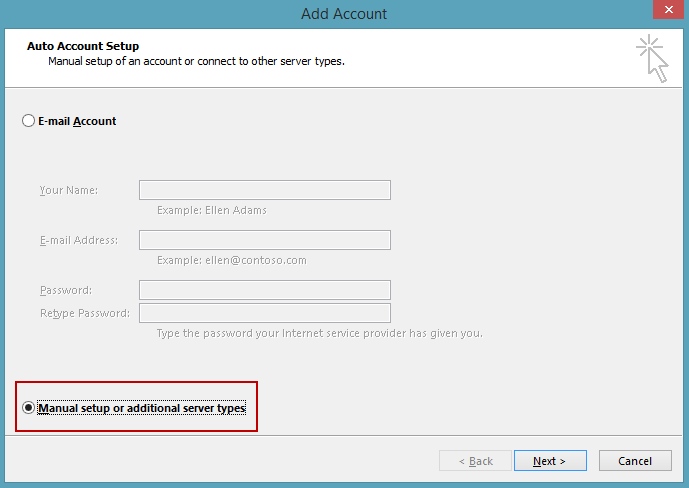
You'll need to use the manual setup option when you configure an Outlook.com IMAP account in Outlook. - Select Manual setup or additional server types and then click Next.

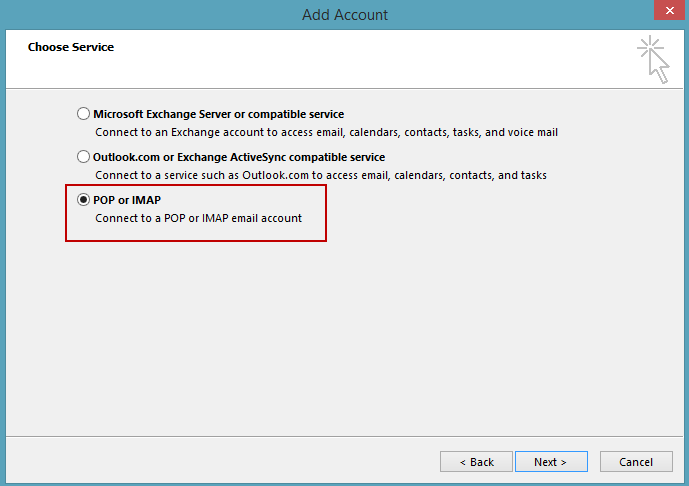
- Choose POP or IMAP from the next screen. Click Next.

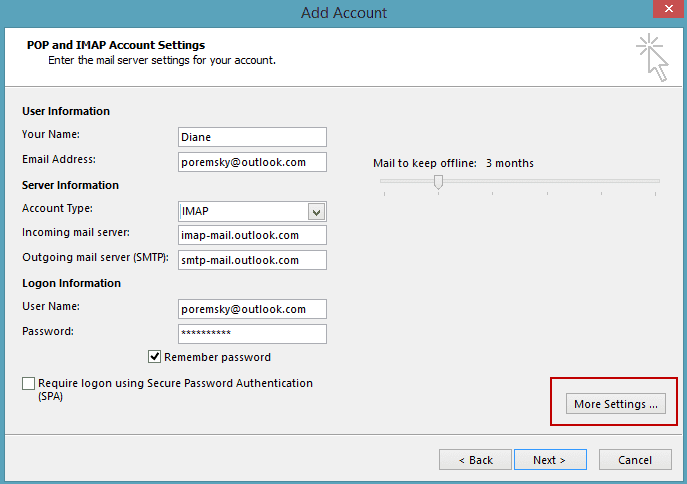
- Enter your display name and email address and the Outlook.com IMAP
server names. Use your email address for the account name and enter your
password.
Incoming mail server: imap-mail.outlook.com
Outgoing mail server (SMTP): smtp-mail.outlook.com

- Click More Settings.
- On Outgoing Server tab, enable outgoing authentication, using the default of same as incoming.

- On Advanced tab, select SSL under Incoming Server (IMAP) and TLS for the Outgoing server. Change the Outgoing server to port 587. (The Incoming Server port should update to 993 automatically when you choose SSL).

- If you prefer to Purge your mail yourself, and not automatically when you change folders, change the setting at the bottom of the Advanced tab.
- Click Ok to return to the Add Account screen
- Adjust the Sync Slider if you want to sync more than the last 3 months to Outlook.
- Click Next to test the settings and exit the dialog.
More Information
Raminfotech Laptop Service
Address: 102, LB Road, Adyar,
LM : Next Ganapathyram Theatre,
Chennai, Tamil Nadu 600020
Phone:098418 14405
Thanks for sharing this helpful discussion. Finding a trustworthy lenovo laptop repair service in GTB Nagar is important for users dealing with frequent laptop issues like battery drain, keyboard faults, display errors, or software crashes. Lenovo Laptop Service Center stands out by offering affordable repairs, clear diagnostics, and doorstep services that save time and effort. If laptops that are out of warranty are handled professionally with cost-effective solutions. Our multi-brand repair expertise makes them a convenient option for homes and offices alike. Anyone looking for dependable Lenovo laptop assistance can contact +91-7042640351 | +91-9891868324 for prompt and reliable support.
ردحذفإرسال تعليق